Agent Loop for Database Performance Analysis
I have recently worked for a client, who had performance issues related to a MSSQL Database. Their application was getting a little old and the database grew both in structure and in volume, resulting in over 300 relations and hundreds of millions of entries for some tables.
Some queries would take over 2 minutes to execute, while others would completely timeout. Performance was very spiky due to the snowball effect of some longer queries, hogging resources and clogging the server.
Initial Analysis Approach
When I started analyzing and digging around, I took out the arsenal of tools one would use in this kind of scenario: XEvents (previously Server Profiler),
Query Planner, Index Usage / Perfs, Dependency Graph of tables, application logs etc.
Unfortunately the sheer volume of information, tables, joins and logs was making my work very hard.
The few queries I managed to identify were extremely complex and were taking me hours to debug. The task was even harder due to the fact I did not have a deeper knowledge of the underlying business logic. Members of the dev team had to spend considerable amount of time explaining to me, not only the "hows", but also the "whys" for some of the stranger architectural decisions.
One such example being: inserting a new entry in the config table for each client, whenever we change a global config option, resulting in hundreds of thousands of insert queries, whenever we click a checkbox in the interface...
Performance Tests
One of the issues our client encountered, was the inability to accurately reproduce the lag and performance issues. One morning, the server would run fine ("fine" is a stretched definition here), and the next one everything would grind to a halt.
It is not sufficient to just measure query execution times in XEvents: to accurately measure the system's performance, we need real performance tests.
I opted for locust since the older solutions like JMeter and Gatling looked too clunky and corporate to me.
Our Robust Albeit Slow Pattern
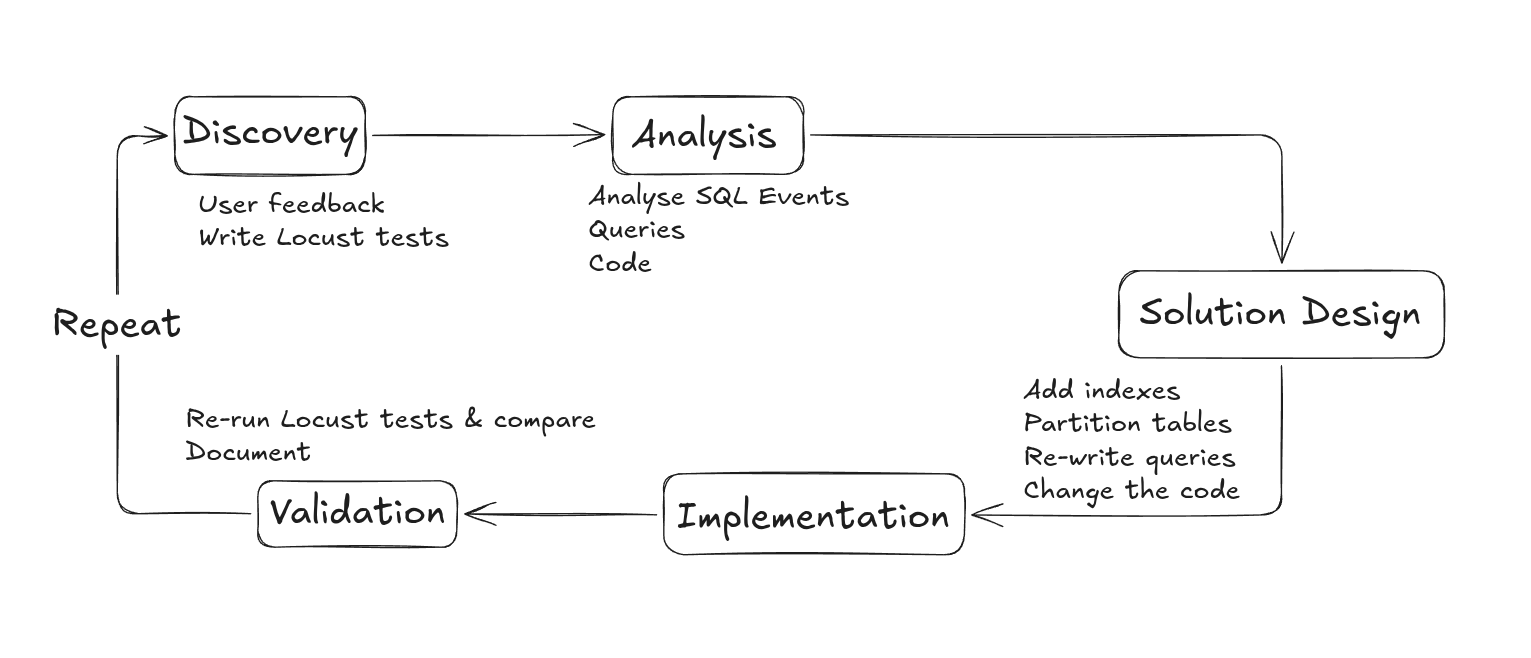
When working for a couple of weeks, the following pattern was adopted by my team :
- The client would prioritize a feature of the software that gets slow, or has lots of customer complaints
- I would write a performance test ahead of time to measure the performance (or lack of)
- An analysis session would be started, lasting from one day to an entire week
- Analyzing executed queries on the page
- Analyzing dependency graph of tables and joins
- Analyzing index usage, partitioning, and query plan costs
- Optimization strategy - ex: new index, adding table partitioning, removing unnecessary joins, inverting joins for better performance, changing the code etc.
- Validate the strategy with the dev team and the feasibility of the change
- Implement and test
- Re-run performance tests and document
The entire cycle would take around 2 weeks and we (a senior developer and I) would deliver 2 to 3 major feature optimizations per sprint.
The question on everyone's mind was, how to speed up this long and cumbersome process and how AI can help us.
How AI Could Help
In theory, an LLM agent could help us with the majority of the tasks in our workflow, especially in the analysis and complex graph interactions.
Another potential quick-win would be the exploration of legacy code and database schema, since I could not, in such short time, get a hang of the complex business logic, developed for over 15 years.
Performance tests are also easily automated, since they essentially repeat the same operations - "login", "click on this link", "send an HTTP request", "extract from request". Once these "skills" are set, a developer could guide the AI into writing perf tests easily and with low risk.
Creating the Agent
The organization we worked with was slightly on the skeptical end in regards to AI usage and preferred a more defensive approach.
Allowing the AI to look at the code could be permitted, although with some limitations.
However, allowing an agent to freely explore the database was a big "no-no" even if the user data was anonymized.
I managed to convince the CEO of the company to allow me to setup a harness in a sand-boxed environment, where we would gradually construct and feed the agent with only what we deemed necessary and useful. I think the "step-by-step" and "go slow" approach is what convinced him, since everything around AI seems to move too fast, and some folks tend to push back a little, feeling out of control.
Using Claude Code, I started simple. I first created an empty project directory as a sandbox and added the base instructions in CLAUDE.md. The prompt was very important, since the default behavior of Claude is to write code. Our case was a little different. We were more on an exploration mission, with lots of access limitations, so the agent needed to be instructed about this.
The "goals" and "non goals" parts were very important in order to avoid the agent wandering in wrong directions.
Feeding Information Into the Agent
Having the sandbox and the prompts ready, it was time to give some real information to the agent.
In order to have full control of what it does and how it does it, I decided to use MCP tool calls. Each action would be wrapped in a local MCP and implemented in Nodejs.
Inside the Nodejs functions, I used the mssql client to connect to the database and perform the required operations, ex: count number of elements in table, get schema for a table, explain a query.
Regarding the source code, I ended up simply copy-pasting a part of the directories and modules, that the development team authorized me.
The agent also had access to the performance tests, written in Python and could run them on demand. The results were exported in a JSON file so that the LLM can easily include them in its context.
To improve accuracy I also added the context7 as a skill. It is an online database of technical documentation, optimized for AI usage, allowing your agent to easily find examples and documentation on almost any technology.
This RAG technique reduces hallucinations and helps insure the model has better more up-to date knowledge about the latest versions of the frameworks used in the project.
Initial Work Results
With all the above requirements set, I started my analysis sessions with the model. Using the latest Anthropic model at the time (early 2026), the task was advancing very well.
It could easily map the database structure, identify issues with queries, as well as some harder to spot problems, like index not triggering, due to function calls in the "where" clause, or expensive geospatial calculation applied within a cycle etc.
Creating a Real Agent Loop
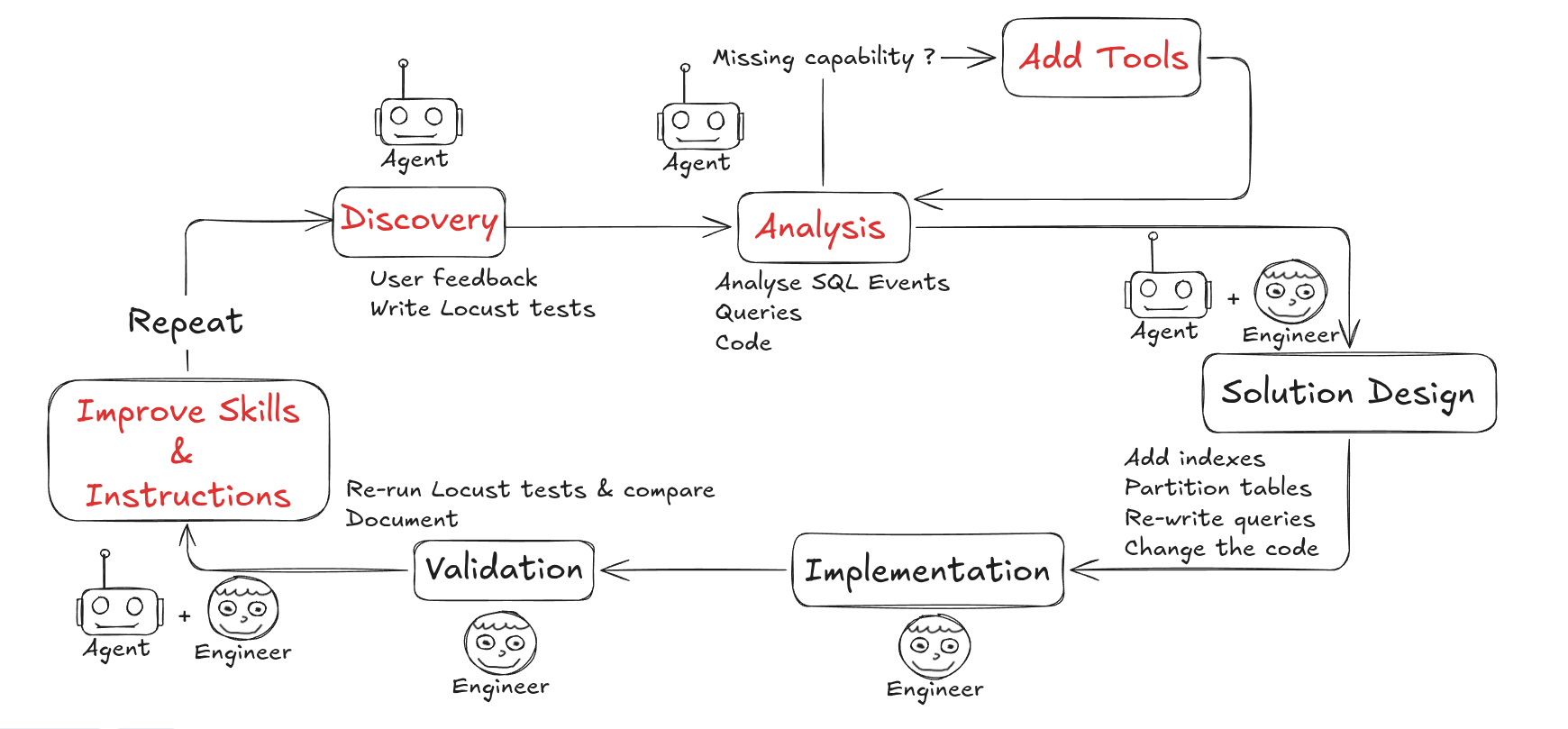
While working on the harness, I was constantly adding improvements and updates to the main prompt, as well as encapsulating any repeating task in a skill. It felt like training a highly motivated employee on how things are done in our company.
After 7 or 8 iterations, the agent became very refined, and I decided to close the "Loop" and wrote a skill, allowing it to write its own skills and tools. The agent would identify that they need a specific way of accessing or modifying the database, would then propose an MCP tool, that I would validate.
We are talking about functions like "get_table_schema", "find_longest_query", "get_table_lines_count" etc.
From this point on, I would mainly converse, give guidelines and validate what the model does.
Work-cycle pre-agent
Work-cycle after integrating the agent
Performance Gains
The performance gain was notable, but not as extreme as some AI companies describe it.
I would analyze and detect DB issues in a matter of hours, instead of days.
However the complexity did not disappear, but was moved to the reviewing, understanding and testing everything the agent was suggesting.
The development team also struggled to integrate the changes as some of them had impact on the rest of the system (changed queries, inverse joins etc).
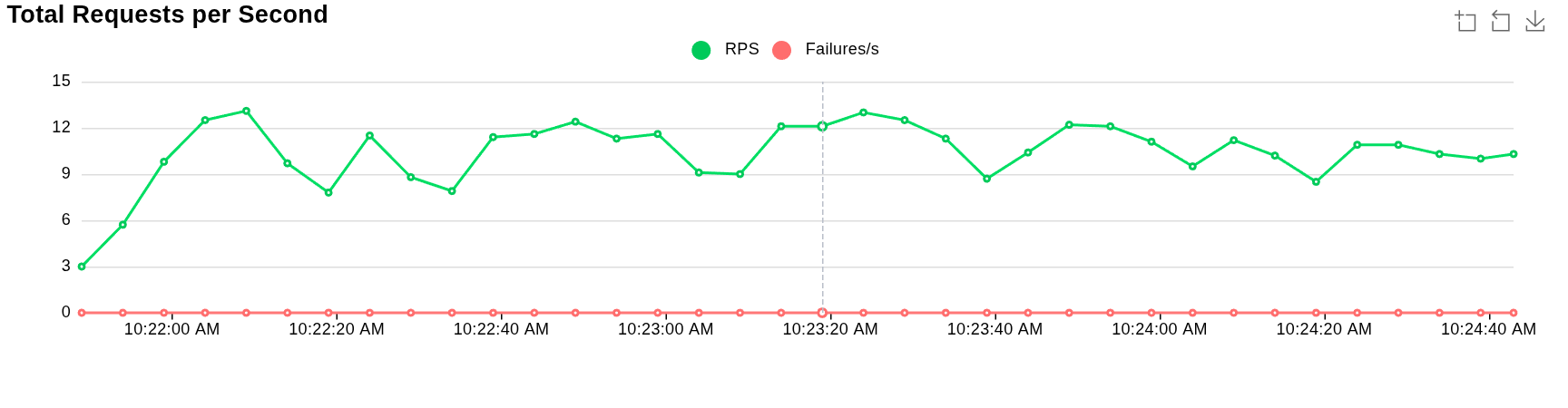
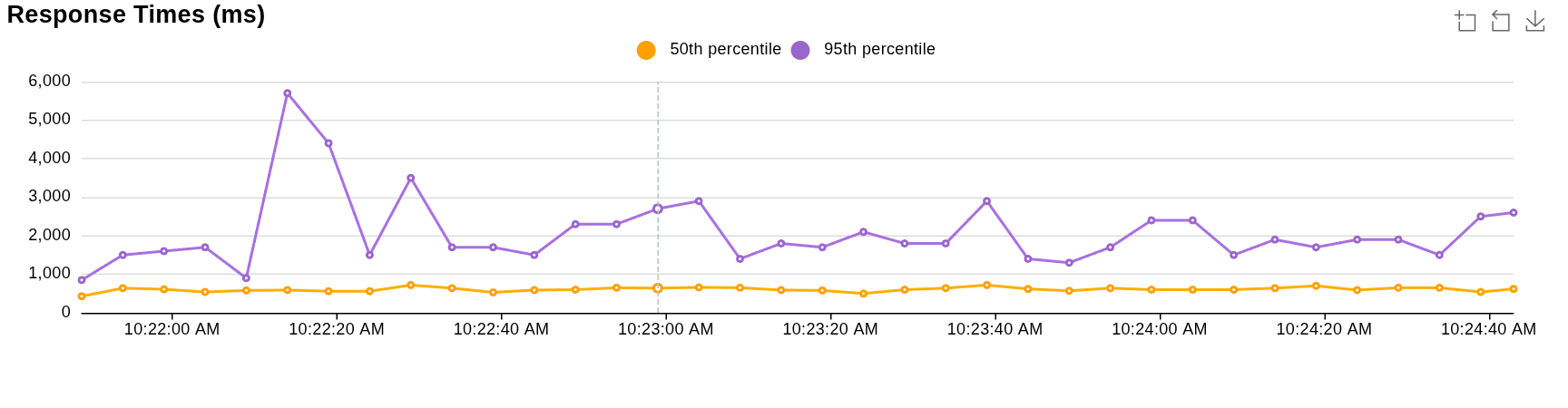
All of this said, we did have some very good results that the AI agent harness helped us obtain:
| Metric | Value Before | Value_After |
|---|---|---|
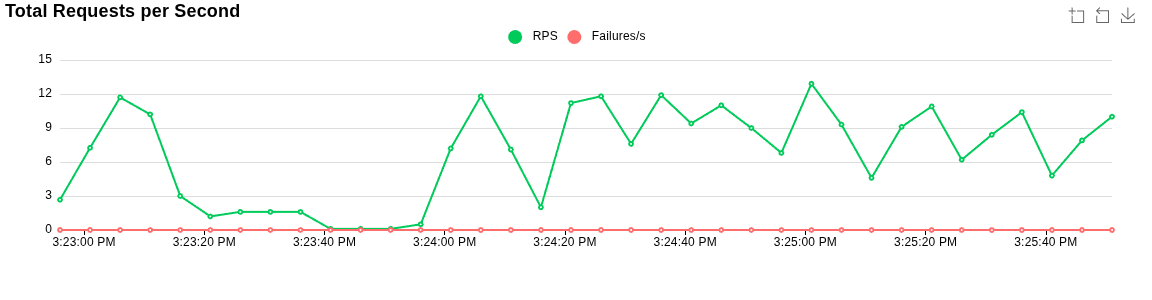
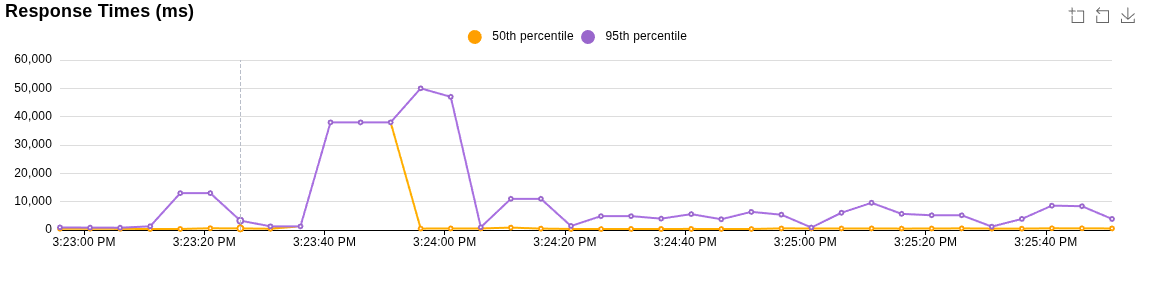
| p95 latency | 50s | 5.7s |
| Average latency | 1242.83ms | 743.27ms |
| Requests per second avg | 6.8 | 10.6 |
Test Results Before Improvements
Test Results After Improvements
Conclusion
This semi-automatic agentic loop allowed me to easily map an enormous chunk of the complex database diagram and discover tens of problematic queries as well as code issues.
The iterative approach of improving the harness was what really made the difference and less the underlying model.
Although AI accelerates the analysis and development process, the bottleneck seems to move towards the rest of the process, thus making gain estimations harder to predict.